First time using AKStream.Next
When you receive an installation package, you do not need to read the entire manual. Complete “choose the package → install → first setup → sign in → connect one video” once, then follow the guides for your own job.
Choose where you are now
| Your current situation | Read this first | What you will see when done |
|---|---|---|
| Not installed yet | Choose an installation method | The service is running and the browser can open initial setup |
| Initial setup is open | Follow the initial setup wizard | You can sign in to the console as an administrator |
| You can already sign in | Connect the first video | A channel appears in Asset details and the page plays video |
| The system is live but something failed | Troubleshoot by visible symptom | You know whether the issue is the device, network, media service, or browser |
| You are writing a business integration | API integration | Your backend completes one authorized call path |
| You are adding meetings to an app or website | RTC SDK integration | Two devices can see and hear each other |
Follow only this route the first time
flowchart LR
    A["Install the program"] --> B["Complete initial setup"]
    B --> C["Sign in to the console"]
    C --> D["Add one device or RTSP URL"]
    D --> E["Activate one video channel"]
    E --> F["Open live preview"]
    F --> G["Record and play back one clip"]
Finish one route before adding more devices, recording schedules, video walls, GB28181 cascading, or RTC. Enabling every module during the first attempt makes troubleshooting much harder.
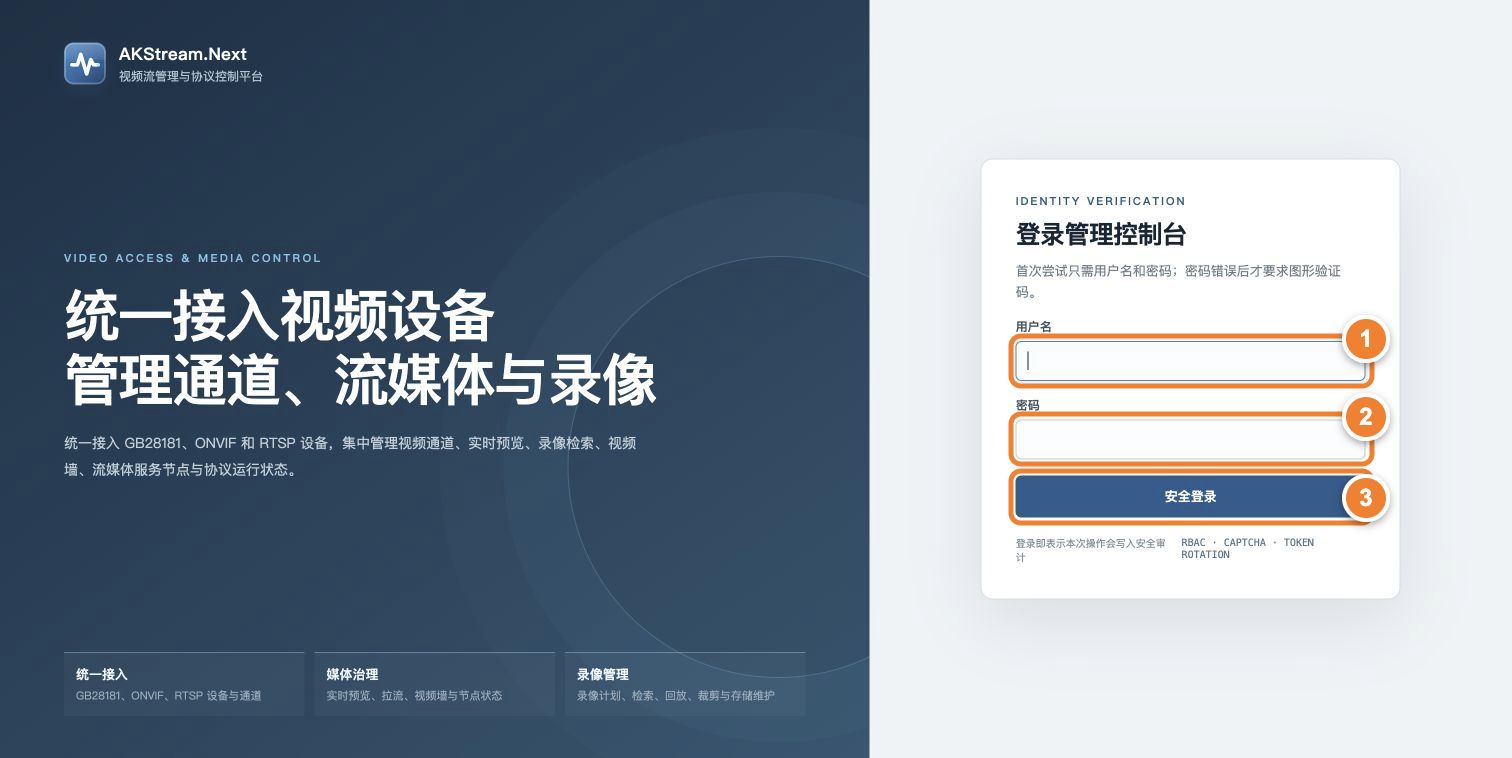
Follow the numbers: ① enter the administrator username created in setup; ② enter its password; ③ select Secure sign-in. Sign-in is complete only when the console opens and shows node status at the top.
What to check after each step
| Step | What success looks like | Where to go when it fails |
|---|---|---|
| Install | status reports the main service and NodeAgent as healthy, and /health responds |
Installation guide for your system |
| Initial setup | The page reports completion and the sign-in page appears after restart | Initial setup troubleshooting |
| Sign in | The AKStream.Next console opens and the top bar shows node status | Security and account checks |
| Connect a device | A device or pending channel appears under Onboarding | Device is offline or cannot be discovered |
| Live preview | Selecting a channel under Asset details shows continuous video | No video or playback failed |
| Recording playback | Recording Center finds a file by time and can play it | Recording file is missing |
Remember only three names at first
- Device: a camera, NVR, or downstream platform.
- Channel: one video view inside a device. Users select a channel for playback and recording.
- Stream: the video data a channel is transferring right now. A channel may exist without a stream when the device is offline.
For a visual explanation, read Devices, channels, and streams, then explore Core concepts.
Next step
- First installation: go to Choose an installation method.
- Installation completed: go to Follow the initial setup wizard.
- You can sign in: go directly to Connect the first video.
- Looking for a specific task: open Using the features.