Online upgrade: complete guide to akn upgrade and page-based upgrade
AKStream.Next provides two formal-package online upgrade entry points: run akn upgrade in the server terminal, or upload and execute the package from “System management → System upgrade” in WebUI. Both entry points ultimately call the same platform upgrade manager and share the same version checks, backups, program switch, health acceptance, and failure rollback rules.
“Online upgrade” does not mean downloading a version automatically from the Internet. The operator must first obtain a complete official release package matching the current operating system and CPU architecture, then submit that local file through CLI or the page. The system never overwrites production from a URL, image tag, or Git branch.
An upgrade interrupts the page, APIs, NodeAgent, the managed MediaServer, and active media workloads. Run it only in a maintenance window. After it starts, do not power off or reboot the host, remove upgrade directories, or submit another upgrade.
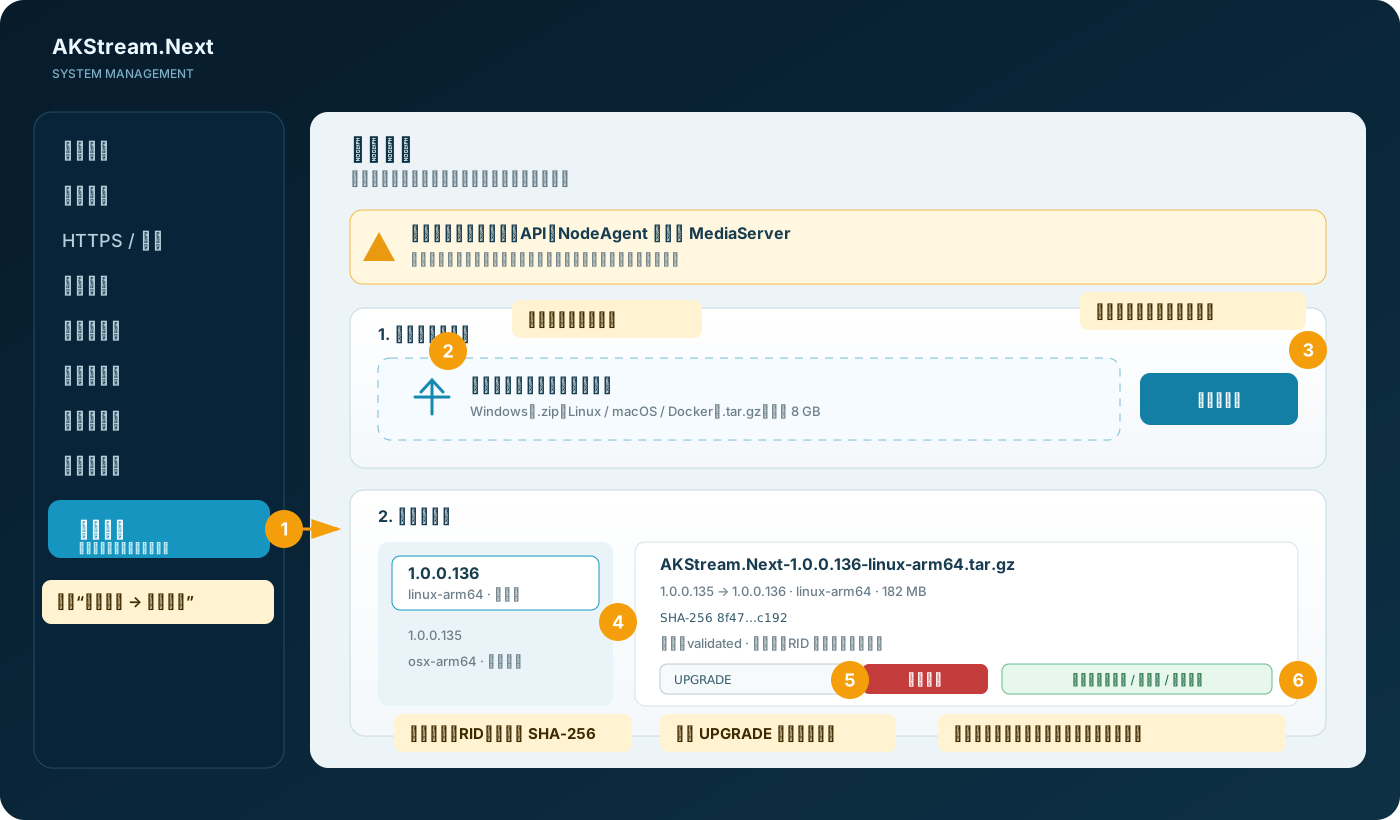
Choose the correct entry point first
| Situation | Recommended entry | Why |
|---|---|---|
| Main service is healthy, WebUI login works, and NodeAgent is online | Page upgrade | Upload, preflight, execution status, and rollback result are shown together for routine operations |
| WebUI or the main service is unavailable, but the host and installed manager still work | akn upgrade |
CLI does not depend on the main HTTP service and can read the installed assembly version before starting a recovery transaction |
| Automated maintenance or serial upgrade of multiple nodes | akn upgrade |
Exit code, stdout, and transaction directory are easy for operations systems to collect |
| An administrator may view records but not execute upgrades | Read-only page | system.upgrade.view lists records; upload and execution require elevated permission |
The installed version does not yet provide akn upgrade |
Bootstrap with the manager from the new package | The new script upgrades the old installation and refreshes the global akn after success |
These are not two different implementations. The page adds authenticated permissions, streamed upload, deep archive preflight, NodeAgent scheduling, and polling across restarts. CLI enters the same platform transaction manager directly from a local package.
flowchart LR
  operator[Operator]
  cli[`akn upgrade`]
  page[System upgrade page]
  api[Main-service upgrade API]
  record[(Persistent upgrade record)]
  agent[NodeAgent]
  job[Detached system job]
  manager[Platform upgrade manager]
  backup[(Config, program, and system-file backup)]
  health{New version healthy?}
  success[Keep new version and record success]
  rollback[Restore previous version and verify again]

  operator --> cli --> manager
  operator --> page --> api
  api --> record
  api --> agent --> job --> manager
  manager --> backup --> health
  health -- yes --> success
  health -- no --> rollback
  job -. state file .-> record
  record -. page polling .-> page
Complete these checks before upgrading
- Read the target release notes, known limitations, and database/configuration compatibility notes.
- Download the original complete package; never copy only
AKStream.Next.dll, NodeAgent, or WebUI files. - Verify the filename, four-part version, operating system, CPU architecture, and extension.
- Independently compare the archive SHA-256 with the release channel. The SHA-256 shown on the page is computed after local receipt and must match the published value.
- Follow Backup, recovery, upgrade, and rollback to prepare database, Config, security material, proxy configuration, recording index, and rollback points.
- Stop creating new clips, transcodes, large recording scans, and other high-I/O jobs; wait for critical writes to finish.
- Ensure both system and data disks can hold the original package, expanded package, current-install backup, and transaction backup.
- Verify FFmpeg, database, NodeAgent, and current health. Page upgrade requires NodeAgent to have been seen within the last 15 seconds.
- Define the maintenance window, rollback decision owner, and post-upgrade observation period.
Filename and platform matrix
| Current deployment | Formal package example | Page/CLI format | RID |
|---|---|---|---|
| Linux x64 | AKStream.Next-1.0.0.136-linux-x64.tar.gz |
.tar.gz |
linux-x64 |
| Linux ARM64 | AKStream.Next-1.0.0.136-linux-arm64.tar.gz |
.tar.gz |
linux-arm64 |
| macOS Intel | AKStream.Next-1.0.0.136-osx-x64.tar.gz |
.tar.gz |
osx-x64 |
| macOS Apple Silicon | AKStream.Next-1.0.0.136-osx-arm64.tar.gz |
.tar.gz |
osx-arm64 |
| Windows x64 | AKStream.Next-1.0.0.136-win-x64.zip |
.zip |
win-x64 |
| Windows ARM64 | AKStream.Next-1.0.0.136-win-arm64.zip |
.zip |
win-arm64 |
| Docker amd64 | AKStream.Next-1.0.0.136-docker-linux-amd64.tar.gz |
.tar.gz |
docker-linux-amd64 |
| Docker ARM64 | AKStream.Next-1.0.0.136-docker-linux-arm64.tar.gz |
.tar.gz |
docker-linux-arm64 |
Only a strictly higher four-part version is accepted. Same-version reinstall, downgrade, or an x64 package submitted to ARM64 is rejected before services stop. A downgrade must use an explicit rollback or restore procedure; do not disguise an old package as an “upgrade.”
Use akn upgrade
CLI is the essential recovery entry when the main service is unavailable. It uses the installed manager to read the installed assembly version, then lets the manager in the new package perform installation and health acceptance.
Linux and macOS
akn info
akn status
sha256sum ./AKStream.Next-1.0.0.136-linux-arm64.tar.gz
sudo akn upgrade ./AKStream.Next-1.0.0.136-linux-arm64.tar.gz
On macOS, use shasum -a 256 and substitute the osx-x64 or osx-arm64 package:
shasum -a 256 ./AKStream.Next-1.0.0.136-osx-arm64.tar.gz
sudo akn upgrade ./AKStream.Next-1.0.0.136-osx-arm64.tar.gz
Windows
Run in an elevated PowerShell window:
akn info
akn status
Get-FileHash .\AKStream.Next-1.0.0.136-win-arm64.zip -Algorithm SHA256
akn upgrade .\AKStream.Next-1.0.0.136-win-arm64.zip
Docker
Run in the host environment where the Compose stack was initially installed. Do not execute it inside the application container:
akn info
akn status
sha256sum ./AKStream.Next-1.0.0.136-docker-linux-arm64.tar.gz
akn upgrade ./AKStream.Next-1.0.0.136-docker-linux-arm64.tar.gz
akn update in a formal customer package is not the transactional upgrade entry. Use akn upgrade for formal Docker releases because it saves Compose, configuration, and database backups and restores the old image and database when the new containers fail health acceptance.
When the old version has no akn upgrade
Do not overwrite the installation directory manually. Extract the new package and use the manager inside the new package to process the original archive against the current installation:
 # Linux
sudo ./Deploy/linux/akstream-next.sh upgrade /absolute/path/AKStream.Next-1.0.0.136-linux-arm64.tar.gz

 # macOS
sudo ./Deploy/macos/akstream-next.sh upgrade /absolute/path/AKStream.Next-1.0.0.136-osx-arm64.tar.gz

 # Docker; --root must be the current deployment root
./Deploy/docker/akstream-next.sh upgrade /absolute/path/AKStream.Next-1.0.0.136-docker-linux-arm64.tar.gz --root /absolute/path/to/current-deployment
On Windows, run from the new package in an elevated PowerShell window:
.\Deploy\windows\akstream-next.ps1 upgrade C:\Packages\AKStream.Next-1.0.0.136-win-arm64.zip
After a successful upgrade, the global akn is replaced by the controlled manager from the new version, so later upgrades can use the short command.
Use the system upgrade page
Open “System management → System upgrade.” Viewing requires system.upgrade.view. Uploading, confirming, and starting require system.upgrade.manage, which also depends on system view, upgrade view, and lifecycle management capabilities.
Step 1: upload and preflight
- Select exactly one unrenamed and unrepacked formal release archive.
- Drag it into the upload area or click the area to choose the file.
- The browser checks the extension, file count, and 8 GB limit, but these are immediate hints only.
- Click “Upload and validate package.” The server streams the raw request body to a temporary file while calculating SHA-256; neither the browser nor managed server memory holds the complete package.
- Wait until the record shows “Prepared.” Preflight does not stop services or start an upgrade automatically.
If Nginx, a gateway, WAF, or load balancer is in front, its request-body and timeout limits must also support the package. The application raises only this Kestrel upload request to 8 GB. If an upstream returns 413, correct the proxy limit; do not split the package or bypass integrity checks.
Step 2: review and execute
- Compare current version, target version, RID, package size, and full SHA-256.
- Confirm status
Prepared, phasevalidated, and no other upgrade inQueuedorRunning. - Enter the case-sensitive confirmation text
UPGRADE. - Click “Start upgrade.” The server uses only the saved target version and fixed paths; the browser cannot substitute an archive or manager at this step.
- After the page reports that NodeAgent has queued the task, do not submit it again.
Step 3: wait for reconnect and terminal result
The page refreshes every 8 seconds while idle and every 2 seconds while an upgrade is active or the connection is recovering. A temporary connection failure after the main service stops is expected; the detached system job continues.
flowchart LR
  A[Upload official package] --> B[Review and confirm]
  B --> C[Wait for reconnection]
  C --> D[Inspect final result]
What the system validates
| Check | Page upload | akn upgrade |
Stops service on failure? |
|---|---|---|---|
| Filename, extension, and one product root | Yes | Yes | No; preflight stops first |
| Four-part version strictly higher than current | Yes | Yes | No |
| Operating system and CPU RID match | Yes | Yes | No |
| Non-empty package and declared/received size match | Yes | Local-file check | No |
| Maximum archive 8 GB, expanded total 16 GB, at most 200,000 entries | Yes | Platform manager applies safe archive checks | No |
Absolute paths, .., empty path segments, symbolic/hard links, and special files |
Rejected | Rejected | No |
VERSION matches the filename version |
Yes | Yes | No |
| Main service, NodeAgent, and platform manager are present | Yes | Yes | No |
Page permission, UPGRADE confirmation, Agent seen within 15 seconds |
Yes | Not applicable | No |
| No two upgrades run concurrently on one instance | Process gate | Lock directory | No |
| FFmpeg and installation runtime remain usable | Executor check | Yes | Checked before service stop where possible |
The page retains at most 50 recent metadata records and never exposes archive absolute paths. After receiving a task, NodeAgent validates again that archive, status, and manager paths all remain inside the automatically configured upgrade root, preventing browser or database content from becoming an arbitrary privileged command.
Understand upgrade status
stateDiagram-v2
  [*] --> Prepared: Upload and preflight pass
  Prepared --> Queued: Enter UPGRADE
  Queued --> Running: Detached job writes state
  Running --> Succeeded: New version health passes
  Running --> RolledBack: New version fails, old version recovers
  Running --> RollbackFailed: New and old versions both fail
  Queued --> Failed: Scheduler or wrapper launch fails
  Running --> Failed: Manager fails without terminal rollback state
  Succeeded --> [*]
  RolledBack --> [*]
  RollbackFailed --> [*]
  Failed --> [*]
| Status | Page meaning | Next action |
|---|---|---|
Prepared |
Package is saved and passed deep preflight; business is not interrupted | Verify SHA-256, RID, and version; enter UPGRADE |
Queued |
Lifecycle operation exists and waits for NodeAgent | Verify Agent online; do not submit again |
Running |
Detached task is backing up, installing, accepting, or rolling back | Keep host online; inspect phase and job log |
Succeeded |
New version installed; main service and NodeAgent passed health acceptance | Perform post-upgrade acceptance and start observation period |
RolledBack |
New version failed and the previous version recovered | Keep transaction data, diagnose the new version, then publish a higher fixed version |
RollbackFailed |
New version and automatic old-version recovery both failed | Stop repeated actions, preserve evidence, and restore from the transaction backup |
Failed |
Scheduler, wrapper, or manager failed before producing a rollback terminal state | Diagnose from phase, error, and log_path |
Common phases include validated, agent-queue, manager-start, backup, install, rollback, complete, upgrade-schedule, upgrade-launch, and manager-failed. Platform managers may add more specific phases. Use terminal status, not phase wording alone, to decide success or rollback.
How backup, switch, and rollback work
flowchart LR
  A[Upload official package] --> B[Review and confirm]
  B --> C[Wait for reconnection]
  C --> D[Inspect final result]
| Platform | Primary backup and rollback point | Success condition |
|---|---|---|
| Linux | Config, previous installation directory, managed systemd/akn/Nginx files, and transaction state; failure restores old directory and system files | Main health, NodeAgent, and post-install acceptance pass |
| macOS | Config, AKStream.Next/NodeAgent/ZLMediaKit/Tools/Deploy component backups, LaunchDaemons, and management command | Main health, NodeAgent, and post-install acceptance pass; one-shot launchd job has no KeepAlive |
| Windows | Config, tools directory, old installation directory, service definitions, and transaction state | Windows services, health, NodeAgent, and post-install acceptance pass |
| Docker | Config, Compose, old manager, old image, and consistent logical MySQL backup | New main-container health and NodeAgent online; failure restores old Compose, image, and database |
The package does not overwrite the formal Config or recording directory with package content. Whether an old binary can read data created during the upgrade still depends on database and configuration backward compatibility. For irreversible migrations, use the complete backup/restore instructions in the release notes.
Find records and logs
| Platform | Page package/status root | Detached task log and transaction backup |
|---|---|---|
| Linux | /var/lib/akstream-next-agent/upgrades/{packages,records,runtime} |
/var/lib/akstream-next-agent/upgrades/jobs/<upgrade-id>/upgrade.log; CLI transactions in /var/lib/akstream-next/upgrades/transactions/ |
| macOS | /Library/Application Support/AKStream.Next/Data/Upgrades/ |
jobs/<upgrade-id>/upgrade.log and transactions/ |
| Windows | %ProgramData%\AKStream.Next\Data\Upgrades\ |
jobs\<upgrade-id>\upgrade.log and transactions\ |
| Docker | Page state maps to <deployment-root>/Data/Upgrades/ |
jobs/<upgrade-id>/upgrade.log; transactions and database backups in <deployment-root>/Updates/transactions/ |
On Linux, a page upgrade runs as a transient unit. Use the upgrade ID to inspect it:
sudo systemctl status akstream-next-upgrade-<32-char-upgrade-id>.service --no-pager -l
sudo journalctl -u akstream-next-upgrade-<32-char-upgrade-id>.service --no-pager
sudo tail -n 200 /var/lib/akstream-next-agent/upgrades/jobs/<32-char-upgrade-id>/upgrade.log
CLI prints package, target version, SHA-256, and transaction directory directly. After RolledBack or RollbackFailed, do not delete the transaction directory first; it is authoritative evidence for diagnosis and manual restoration.
Handle common failures
| Symptom or message | Common cause | Correct action |
|---|---|---|
| Page upload returns 413 or proxy closes the connection | Nginx/WAF/gateway body or timeout limit is below package size | Correct the controlled upload-route limit and upload again; do not split or rename the package |
| “Filename must be four-part version-platform-architecture” | Package renamed, version is not four parts, or extension is wrong | Download again and preserve the official filename |
| “Only a higher version is allowed” | Same-version reinstall or downgrade | Use a higher fixed release; downgrade through explicit restore |
| “Package platform X, current platform Y” | OS/CPU/RID mismatch | Download the package for the current instance; do not rely on emulation |
Stays in agent-queue |
NodeAgent offline, control WebSocket broken, or operation not claimed | Inspect Agent status and logs; do not make the main process exit itself |
| No runtime state file within 30 seconds | systemd-run/launchd/Scheduled Task/runner did not start, or wrapper failed to parse | Inspect NodeAgent and system-job logs; on Windows also check the SYSTEM Scheduled Task |
| Page is briefly unavailable during upgrade | Main service is being replaced and restarted | Keep the page open and wait for automatic reconnect; do not start again after refresh |
RolledBack |
New installation or health acceptance failed; old version recovered | Continue on old version, retain diagnostics, and publish a higher fixed version |
RollbackFailed |
Old version, Config, database, or host environment also failed health | Stop automation, preserve evidence, and use transaction backup plus disaster-recovery runbook |
| Upgrade lock already exists | Another task runs, or an abnormal previous task left the lock | First prove no process/system job is running; only then handle the lock manually |
| FFmpeg unavailable | FFmpeg used by the formal installation is missing | Restore an executable matching the architecture before retrying |
Perform post-upgrade acceptance
Upgrade-manager health is only the first layer. Continue with Production deployment acceptance:
akn inforeports the target four-part version, RID, installation directory, and configuration directory.akn statusreports the main service, NodeAgent, and/healthhealthy.- Readiness has no blocking database, MediaServer, storage, licensing, or background-task issue.
- Inspect configuration version and source for pending restart or path drift.
- Verify one real-device live stream, stop, and resource release.
- Verify new recording output, index query, and Range playback or download.
- Exercise the required GB28181/ONVIF/RTSP/RTC path for the site.
- Observe error rate, database timeouts, protocol-command timeouts, disk, and process resources.
- Retain the source package, previous version, and transaction directory until observation completes.
For multiple nodes, upgrade a validation node first, observe it, and then expand in batches. Do not upgrade every control, protocol, and media node together. Existing live streams, recordings, RTP, and RTC sessions are not guaranteed to migrate losslessly across versions.
Completion criteria
- The package is a complete formal release for the target platform and architecture with a higher four-part version.
- External SHA-256, internal version, protection manifest, and core-file hashes are verified.
- Upgrade status is
Succeeded, or failure is explicitlyRolledBackwith critical old-version paths restored. - Main service, NodeAgent, database, MediaServer, recording, and required protocol paths pass acceptance.
- Upgrade logs, transaction directory, operator, time, target version, and observation decision are archived.
RollbackFailed, unknown status, or long-runningRunningis not completion.
For other CLI parameters, see Service management commands. For consistent backup and disaster-recovery boundaries, see Backup, recovery, upgrade, and rollback.