Receive important AKStream.Next events with third-party Webhooks
Third-party Webhooks push important device, RTC, MediaServer, stream, and recording facts to external systems. One endpoint equals one delivery plan. Multiple plans have independent secrets, event scopes, timeouts, retries, tests, and delivery history.
Receiver contract first: expose an HTTPS URL reachable from the AKStream.Next node, for example https://events.example.com/akstream/webhook. Your application chooses the path and accepts POST with an UTF-8 JSON body. Verify the signature, dispatch on eventName, process data, then respond with any 2xx (typically 204 No Content). Put the complete URL and a shared secret into the AKStream.Next delivery plan. AKStream.Next calls your endpoint; the /api/v2/system/webhooks/... APIs are for managing delivery plans, not receiving notifications. Reverse proxies must preserve the body and X-AKStream-* headers. See the wire contract and event fields below.
Run a real test for every plan before production. Valid fields do not prove DNS, TLS, WAF, signature verification, or receiver idempotency.
Never put credentials in the URL. Endpoint URLs reject embedded credentials, query strings, and fragments. Existing shared secrets are encrypted at rest and are never returned to the page.
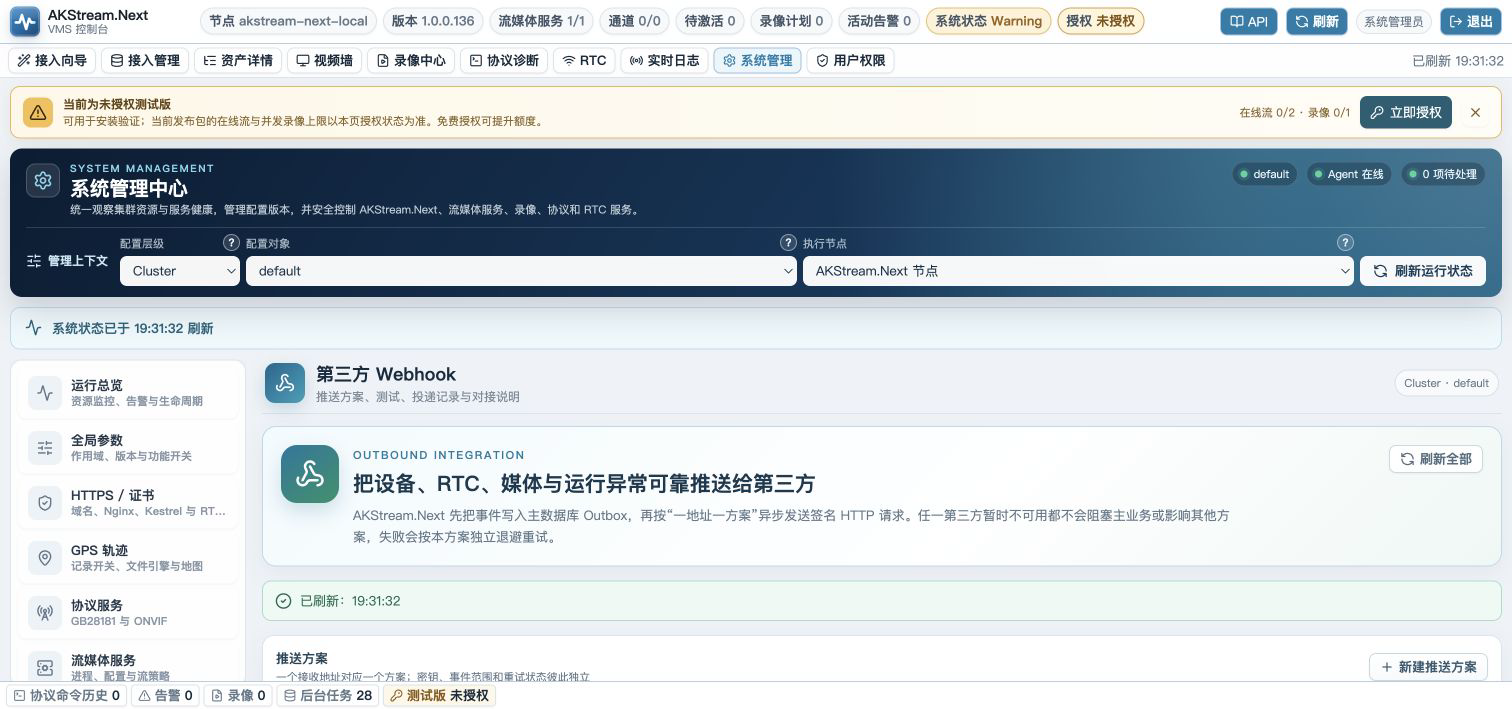
Quick start
- Open System Management → Third-party Webhook. The entry is located after RTC / SFU and before Runtime Environment.
- Select New delivery plan and enter a name, purpose, and one HTTPS endpoint.
- Generate a plan-specific HMAC secret and store it in the receiver’s secret manager.
- Select explained events from the Media, GB28181, RTC, and raw-hook groups.
- Save the plan, then send a test to that plan only.
- Confirm that its delivery row reaches Completed with the receiver’s real 2xx status.
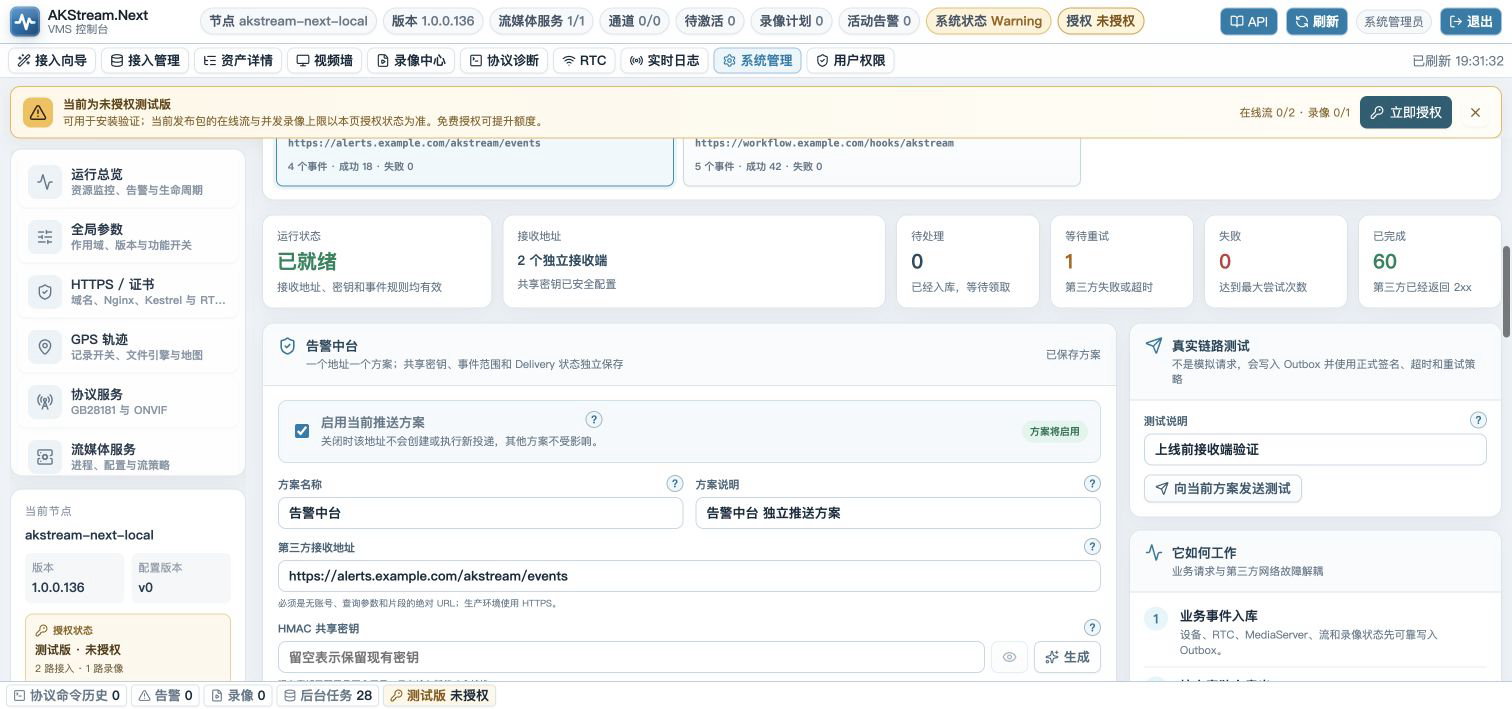
Understand multiple delivery plans
flowchart LR
  device[GB28181 devices] --> outbox[(Business Outbox)]
  rtc[RTC rooms and participants] --> outbox
  media[MediaServer / streams / recordings] --> outbox
  outbox --> fanout[Match enabled plans]
  fanout --> deliveryA[(Delivery A)] --> planA[Alerting endpoint]
  fanout --> deliveryB[(Delivery B)] --> planB[Workflow endpoint]
  fanout --> deliveryC[(Delivery C)] --> planC[Data endpoint]
The same EventId is used across matching plans. Each plan signs with its own secret, so signatures differ. Plan A can complete while Plan B retries; neither result overwrites the other.
Plan fields
| Field | Required | Rule | Purpose |
|---|---|---|---|
| Name | Yes | Unique per cluster, 1–128 characters | Identify the receiver and use case |
| Description | No | Up to 512 characters | Owner, ticket, or integration boundary |
| Endpoint | Yes | Absolute HTTP(S), no credentials/query/fragment | Exactly one address per plan |
| HMAC secret | On create | 16–256 characters | Authenticate the raw request body |
| Enabled | Yes | Independent per plan | Disabling one plan does not affect others |
| Events | Yes | At least one exact name or .* prefix |
Minimize disclosed event data |
| Allow HTTP | No | Off by default | Controlled isolated networks only |
| Timeout | Yes | 2–30 seconds | Bound one receiver call |
| Max attempts | Yes | 1–10 | End automatic retries and require an operator |
Leaving the secret field empty while editing preserves the existing secret. Entering a new value rotates only that plan. Archiving cancels unfinished deliveries and preserves historical evidence.
Choose events
Standard events are checkboxes with a trigger, use case, and volume indicator. Operators do not need to type internal names.
Media and recordings
| UI label | Event name | Trigger | Recommendation |
|---|---|---|---|
| MediaServer started | media.server.started |
Lifecycle transitions from non-online to online | Recommended |
| MediaServer stopped | media.server.stopped |
Managed stop or lifecycle transition to offline | Recommended |
| MediaServer crashed | media.server.crashed |
The managed process disappears unexpectedly | Recommended; alert |
| MediaServer start failed | media.server.start_failed |
Automatic startup does not remain running | Recommended; alert |
| MediaServer recovered | media.server.recovered |
A previously offline server becomes online again | Recommended; resolve alert |
| Stream online / offline | media.stream.online / media.stream.offline |
Stream registration or deregistration | Recommended |
| Recording file completed | recording.file.completed |
An MP4 segment is finalized | Recommended; file name only |
MediaServer crash and start-failure events come from managed process and lifecycle state transitions, not from decorative health polling. The recording event exposes the file name but not the server’s absolute path.
GB28181 devices
| UI label | Event name | Trigger |
|---|---|---|
| First registration | device.gb28181.registered |
The first successful REGISTER creates the device record |
| Explicit unregister | device.gb28181.unregistered |
Unregister completes channel and session convergence |
| Heartbeat timeout | device.gb28181.offline |
Online state changes to offline after the heartbeat window |
| Device recovered | device.gb28181.recovered |
An offline device successfully REGISTERs or sends Keepalive |
| Registration authentication failed | device.gb28181.auth_failed |
Digest authentication fails and stale online state is governed |
Repeated REGISTER refreshes and Keepalive requests do not generate recovery storms when the device state did not change.
RTC
| UI label | Event name | Trigger |
|---|---|---|
| Room created / closed | rtc.room.created / rtc.room.closed |
Room persistence succeeds; close and media release complete |
| Participant joined / left | rtc.participant.joined / rtc.participant.left |
Secure admission completes; a participant explicitly leaves |
| Participant timed out | rtc.participant.timed_out |
Heartbeat timeout governance completes |
| Publication started / stopped / failed | rtc.publication.started / .stopped / .failed |
WHIP or RTMP publication state changes |
| Room recording failed | rtc.recording.failed |
Room recording start or stop fails |
Chat messages, whiteboard strokes, normal heartbeats, and page refreshes are not recommended external events.
Raw MediaServer hooks
zlm.webhook.* includes authentication, keepalive, play, publish, and flow-report hooks. Enable the wildcard only after the receiver has capacity limits and a reviewed data scope. Stable business events above are the normal integration surface.
Legacy snake_case rules such as zlm.webhook.on_stream_changed remain compatible and are normalized when the plan is saved.
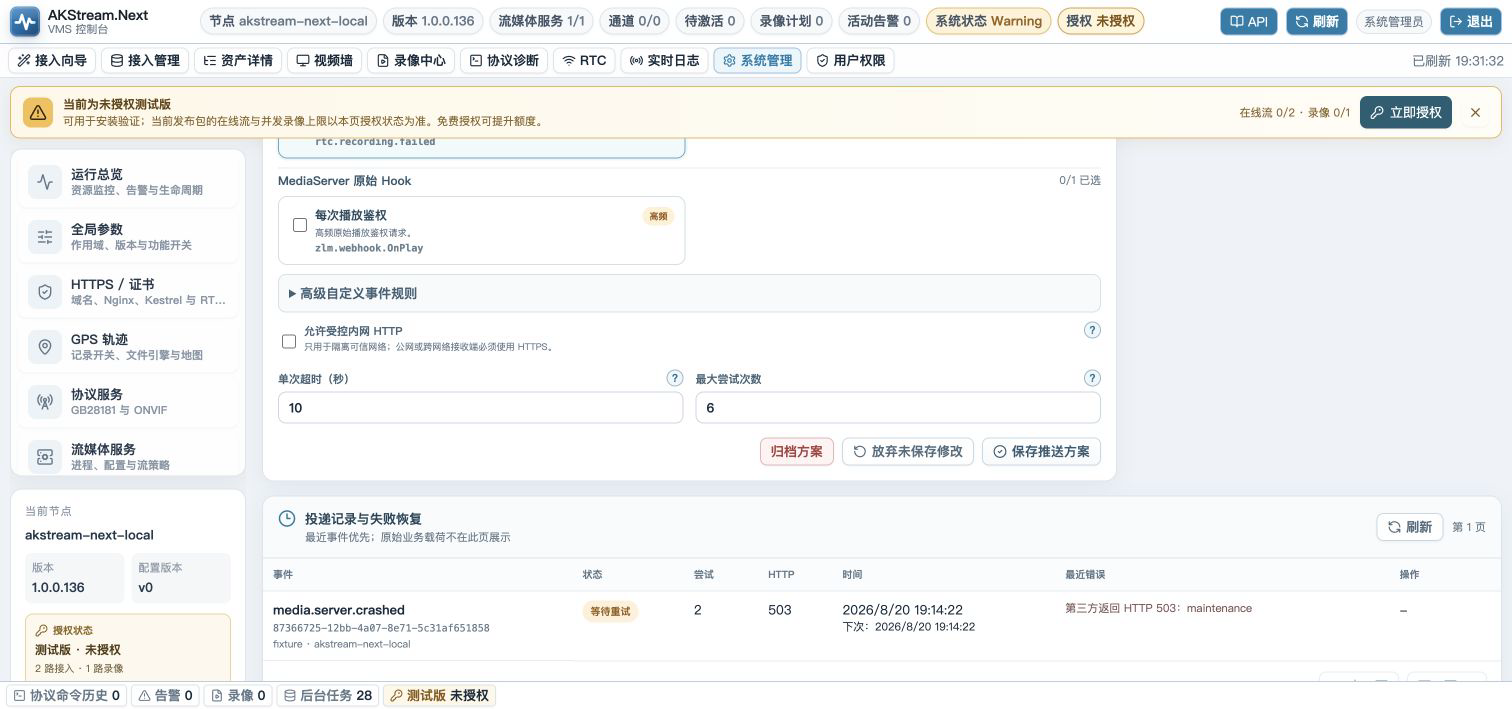
Test and recover deliveries
The test action emits system.webhook.test to the selected plan only. This event is created only by an authorized operator, bypasses the normal event-scope check for that one plan, and exercises the real Outbox, signature, timeout, and retry path.
sequenceDiagram
  actor Admin
  participant Web as Webhook page
  participant API as AKStream.Next API
  participant DB as Outbox / Delivery
  participant Worker as Dispatcher
  participant Receiver
  Admin->>Web: Test selected plan
  Web->>API: POST /subscriptions/{id}/test
  API->>DB: Insert targeted test event
  Worker->>DB: Claim Delivery for this plan
  Worker->>Receiver: POST JSON + HMAC headers
  alt Receiver returns 2xx
    Receiver-->>Worker: 204
    Worker->>DB: Completed
  else Timeout or non-2xx
    Receiver-->>Worker: 500 / timeout
    Worker->>DB: Waiting for retry
  end
stateDiagram-v2
  [*] --> Pending
  Pending --> Delivering: conditional claim
  Delivering --> Completed: 2xx
  Delivering --> WaitingRetry: timeout / network / non-2xx
  WaitingRetry --> Delivering: due
  Delivering --> Failed: attempts exhausted
  Failed --> Pending: operator retry
  Pending --> Canceled: plan archived
  WaitingRetry --> Canceled: plan archived
The page never renders the raw Outbox payload. It shows the event name, EventId, attempts, HTTP status, timestamps, and a bounded error summary.
Implement a receiver
AKStream.Next sends POST to the complete URL configured for the plan, with Content-Type: application/json; charset=utf-8. Preserve the raw body, verify the timestamp and HMAC, and only then parse JSON. No GET endpoint or receiver-side polling is required. The field names below match the 1.0.0.158 producer code: data is not uniformly camel-cased.
Request body
{
  "schemaVersion": 1,
  "eventId": "e0b4e218-a6bb-487b-9af2-86e042a87c78",
  "eventName": "device.gb28181.registered",
  "occurredAtUtc": "2026-08-20T08:30:00Z",
  "source": "gb28181",
  "nodeId": "node-01",
  "data": {
    "DeviceId": "34020000001320000001",
    "Name": "East gate camera",
    "Direction": "Server",
    "Status": "Online",
    "previousStatus": null,
    "reason": "REGISTER accepted",
    "occurredAtUtc": "2026-08-20T08:30:00Z"
  }
}
The top-level envelope is generated by the dispatcher. data preserves the property names chosen by each event producer, including uppercase initials. Timestamps and IDs in examples illustrate format, not a fixed real delivery.
| Envelope field | Type | Meaning |
|---|---|---|
schemaVersion |
integer, currently 1 |
Parsing version; do not guess the shape of an unsupported version. |
eventId |
UUID string | Stable business-event identity across retries and plans; use for idempotency. |
eventName |
string | Selects the data schema below; log or ignore unknown names. |
occurredAtUtc |
UTC ISO 8601 string | Outbox creation time, not this HTTP attempt's time. |
source |
string | Producer module: gb28181, rtc, media, recording, zlm, or outbound-webhook-test. |
nodeId |
string | Originating AKStream.Next node; not a MediaServer ID. |
data |
JSON value, object for current standard events | Event-specific fields. Do not deserialize all events into one rigid type. |
Event-specific data fields
These are the fields actually emitted by the current producers. Route by eventName, preserve exact capitalization, tolerate additional fields, and treat “nullable” as a present JSON property whose value may be null.
| Events | Fields, types, and meaning |
|---|---|
device.gb28181.registered / unregistered / offline / recovered / auth_failed |
DeviceId string: GB28181 device ID; Name nullable string: device name; Direction: stored device direction; Status string: current status; previousStatus nullable string: previous status; reason string: reason for transition; occurredAtUtc UTC timestamp. Authentication-failure reasons may contain diagnostic text; do not publish them openly. |
media.stream.online / offline |
MediaServerId nullable string: server ID; Vhost, App nullable strings: ZLM virtual host and app; streamId nullable string: stream ID; schema nullable string: protocol, such as rtsp; online boolean; occurredAtUtc UTC timestamp. A stream may generate separate notifications for different protocol tracks. |
recording.file.completed |
MediaServerId, Vhost, App, streamId as above; fileName nullable string: finalized MP4 file name, not an absolute path or download URL; fileSize nullable string: upstream file_size; duration nullable string: upstream time_len; occurredAtUtc UTC timestamp. Use an authorized recording API for lookup/download. |
media.server.started / stopped / recovered |
NodeId string: control node; ZlmNodeId nullable string: ZLM node; mediaServerId string: media server; previousStatus, status strings: before/after; hookName string: triggering Hook; occurredAtUtc UTC timestamp. |
media.server.crashed |
NodeId, zlmNodeId: node IDs; previousPid integer: previous process ID; LastAction nullable string: last managed action; reason = managed-process-exited-unexpectedly; occurredAtUtc UTC timestamp. |
media.server.start_failed |
NodeId, zlmNodeId, LastAction as above; reason = managed-start-failed; occurredAtUtc UTC timestamp. Full failure logs are not in this notification. |
rtc.room.created |
RoomId string: meeting ID; Name, RoomType, MediaServerId, Status: room properties; ScheduledStartAtUtc, ScheduledEndAtUtc: nullable schedule timestamps. This event uses the room entity ID as stable eventId. |
rtc.room.closed; rtc.participant.joined / left / timed_out; rtc.publication.started / stopped / failed; rtc.recording.failed |
Shared fields: RoomId string: meeting ID; Sequence integer: room-event sequence; EventType string: exact internal transition; ParticipantId string: related actor (possibly system); TargetParticipantId nullable string; occurredAtUtc UTC timestamp. These notifications do not contain device ID, participant name, chat/whiteboard content, media URL, or recording URL. Query authorized business APIs when those details are needed. |
system.webhook.test |
actor string: test initiator; message string: test message; testedAtUtc UTC timestamp. Delivered only to the selected plan. |
zlm.webhook.<HookName> |
HookName string: normalized ZLM Hook name; MediaServerId, App, Stream nullable strings; RawJson string containing the upstream Hook JSON, requiring a second JSON parse; ReceivedAt offset timestamp. This is not a stable business schema. The outer redaction pass does not parse or redact inside the RawJson string; subscribe cautiously, especially to authentication/play Hooks. |
For example, a participant-joined notification carries this data object:
{"RoomId":"room-demo-001","Sequence":18,"EventType":"participant-joined","ParticipantId":"p-demo-001","TargetParticipantId":null,"occurredAtUtc":"2026-09-28T02:30:00Z"}
For a raw Hook, the wrapping is "data":{"HookName":"OnPlay","RawJson":"{\"app\":\"live\"}"}. Only consumers that subscribe to raw Hooks should parse RawJson a second time. Structured JSON properties named secret, password, passwd, token, accessToken, refreshToken, authorization, cookie, licenseCode, requestCode, apiKey, or params are replaced with [REDACTED] before sending; this does not guarantee redaction of an embedded RawJson string.
Headers and signature
| Header | Meaning |
|---|---|
X-AKStream-Event |
Event name |
X-AKStream-Event-Id |
Stable EventId across plans and retries |
X-AKStream-Subscription-Id |
Current delivery-plan ID |
X-AKStream-Timestamp |
Unix seconds used in the signature |
X-AKStream-Signature |
v1=<lowercase HMAC-SHA256 hex> |
Idempotency-Key |
Equal to EventId |
Illustrative HTTP request (the signature is a placeholder; compute it from the actual body):
POST /akstream/webhook HTTP/1.1
Host: events.example.com
Content-Type: application/json; charset=utf-8
X-AKStream-Event: rtc.participant.joined
X-AKStream-Event-Id: 96f8f29e-a6e2-46c4-bb32-99a643043f2a
X-AKStream-Subscription-Id: 538fb28e-7739-4e44-b747-df375e9228d7
X-AKStream-Timestamp: 1790562600
X-AKStream-Signature: v1=<64-character lowercase hex digest>
Idempotency-Key: 96f8f29e-a6e2-46c4-bb32-99a643043f2a

{"schemaVersion":1,"eventId":"96f8f29e-a6e2-46c4-bb32-99a643043f2a","eventName":"rtc.participant.joined","occurredAtUtc":"2026-09-28T02:30:00Z","source":"rtc","nodeId":"node-01","data":{"RoomId":"room-demo-001","Sequence":18,"EventType":"participant-joined","ParticipantId":"p-demo-001","TargetParticipantId":null,"occurredAtUtc":"2026-09-28T02:30:00Z"}}
The signature input is:
<timestamp>.<raw HTTP request body>
The dot is a literal .; do not add angle brackets, whitespace, or a newline. Use the current plan's secret as the UTF-8 HMAC-SHA256 key, encode the digest as lowercase hex, and prefix it with v1=. Verify the received body before parsing/reserializing it and compare digests in constant time. Also check a bounded timestamp window (for example ±300 seconds), schemaVersion, and that event name/ID headers agree with the body. Every retry gets a fresh timestamp/signature but retains eventId.
Return any 2xx (200, 201, 202, or 204) only after durable business processing. The response body has no required schema and is not parsed for business data. Network errors, timeout, and non-2xx cause plan-specific retries (2–30 second per-attempt timeout, 1–10 attempts, backoff starting around 5 seconds and capped at 300 seconds). Never return 200 for a processing failure. A lost response can produce a duplicate after a successful commit: put the event-ID uniqueness record and business change in the same transaction. Use eventId for one plan or (subscriptionId, eventId) if several plans feed one receiver. Use 401/403 for failed verification, 405 for a wrong method, and 5xx for temporary failures.
Runnable Node.js example
Store the secret outside source code and shell history used for routine operations:
export WEBHOOK_SECRET='the plan secret copied from AKStream.Next'
node receiver.mjs
import crypto from 'node:crypto'
import http from 'node:http'

const secret = process.env.WEBHOOK_SECRET
if (!secret) throw new Error('WEBHOOK_SECRET is required')
const seen = new Set()

http.createServer((request, response) => {
  if (request.method !== 'POST' || request.url !== '/akstream/webhook') {
    response.writeHead(405).end()
    return
  }
  const chunks = []
  request.on('data', chunk => chunks.push(chunk))
  request.on('end', () => {
    try {
      const rawBody = Buffer.concat(chunks)
      const timestamp = String(request.headers['x-akstream-timestamp'] || '')
      const supplied = String(request.headers['x-akstream-signature'] || '').replace(/^v1=/, '')
      if (!/^\d+$/.test(timestamp) || Math.abs(Date.now() / 1000 - Number(timestamp)) > 300) throw new Error('stale timestamp')
      const expected = crypto.createHmac('sha256', secret).update(`${timestamp}.${rawBody.toString('utf8')}`, 'utf8').digest('hex')
      const left = Buffer.from(supplied, 'hex')
      const right = Buffer.from(expected, 'hex')
      if (left.length !== right.length || !crypto.timingSafeEqual(left, right)) throw new Error('invalid signature')
      const event = JSON.parse(rawBody.toString('utf8'))
      if (event.schemaVersion !== 1 || event.eventId !== request.headers['x-akstream-event-id']
          || event.eventName !== request.headers['x-akstream-event']) throw new Error('invalid event envelope')
      if (!seen.has(event.eventId)) { seen.add(event.eventId); console.log(event.eventName, event.data) }
      response.writeHead(204).end()
    } catch (error) {
      console.error(error.message)
      response.writeHead(401).end()
    }
  })
}).listen(9080, '127.0.0.1')
The 127.0.0.1 listener and in-memory Set are for same-machine testing only. On a separate host, configure the listener, reverse proxy, and plan URL so that the same HTTPS path is reachable. Limit body size in production and commit idempotency with the business transaction. The receiver does not need an AKStream.Next administrator token; its authentication credential is the plan's HMAC secret.
API reference
| Method | Path | Permission | Purpose |
|---|---|---|---|
| GET | /api/v2/system/webhooks/status |
system.view |
Aggregate plan and delivery state |
| GET | /api/v2/system/webhooks/catalog |
system.view |
Grouped event catalog |
| GET | /api/v2/system/webhooks/subscriptions |
system.view |
List redacted plans |
| POST | /api/v2/system/webhooks/subscriptions |
system.config.manage |
Create a plan |
| PUT | /api/v2/system/webhooks/subscriptions/{id} |
system.config.manage |
Update a plan and optionally rotate its secret |
| POST | /api/v2/system/webhooks/subscriptions/{id}/archive |
system.config.manage |
Archive while preserving history |
| POST | /api/v2/system/webhooks/subscriptions/{id}/test |
system.config.manage |
Test only the selected plan |
| GET | /api/v2/system/webhooks/subscriptions/{id}/deliveries |
system.view |
Read per-plan delivery history |
| POST | /api/v2/system/webhooks/deliveries/{id}/retry |
system.config.manage |
Retry one failed delivery |
Upgrade and migration
On the first start after upgrading, the legacy single endpoint under AkStream:OutboundWebhook is migrated to a plan named “Default delivery plan”. Its secret is immediately re-encrypted with the current installation's data-protection key, and migration logs never print the endpoint credential or secret.
Migration runs once. As soon as any active or archived plan exists, startup will not create another default plan. The legacy configuration remains only for the compatibility window and is no longer authoritative for multi-plan delivery. Back up the new tables before rolling back because older versions cannot represent multiple plans without data loss.
Troubleshooting
| Symptom | Check |
|---|---|
| Test button disabled | Select an enabled plan with a configured secret |
| Waiting for retry | HTTP status → DNS → TLS chain → WAF/proxy → receiver logs |
| Receiver returns 401 | Raw-body verification → timestamp window → correct plan secret |
| Duplicate event | Enforce receiver idempotency by EventId |
| Plan A succeeds, B fails | Expected isolation; retry B only |
| No GB28181 event | Confirm a real device state transition occurred |
| No RTC event | Confirm secure join/leave or room lifecycle completed |
| No MediaServer crash event | Check managed startup task, lifecycle hooks, Outbox, and selected events |
| Raw payload is not shown in the page | This is intentional; use controlled server logs and business-entity APIs |
Start with one test plan and recommended events. Add more plans only after each receiver passes its own real test.