Create an RTC meeting and troubleshoot connectivity
The Video meeting page combines participant cameras, microphones, and screens in an SFU room. 1.0.0.158 can attach authorized external channels, while specific GB28181/RTSP devices and codecs still need target-environment validation. Meeting media is not automatically transcoded for every client. An on-demand full-meeting MP4 is separate from live SFU forwarding.
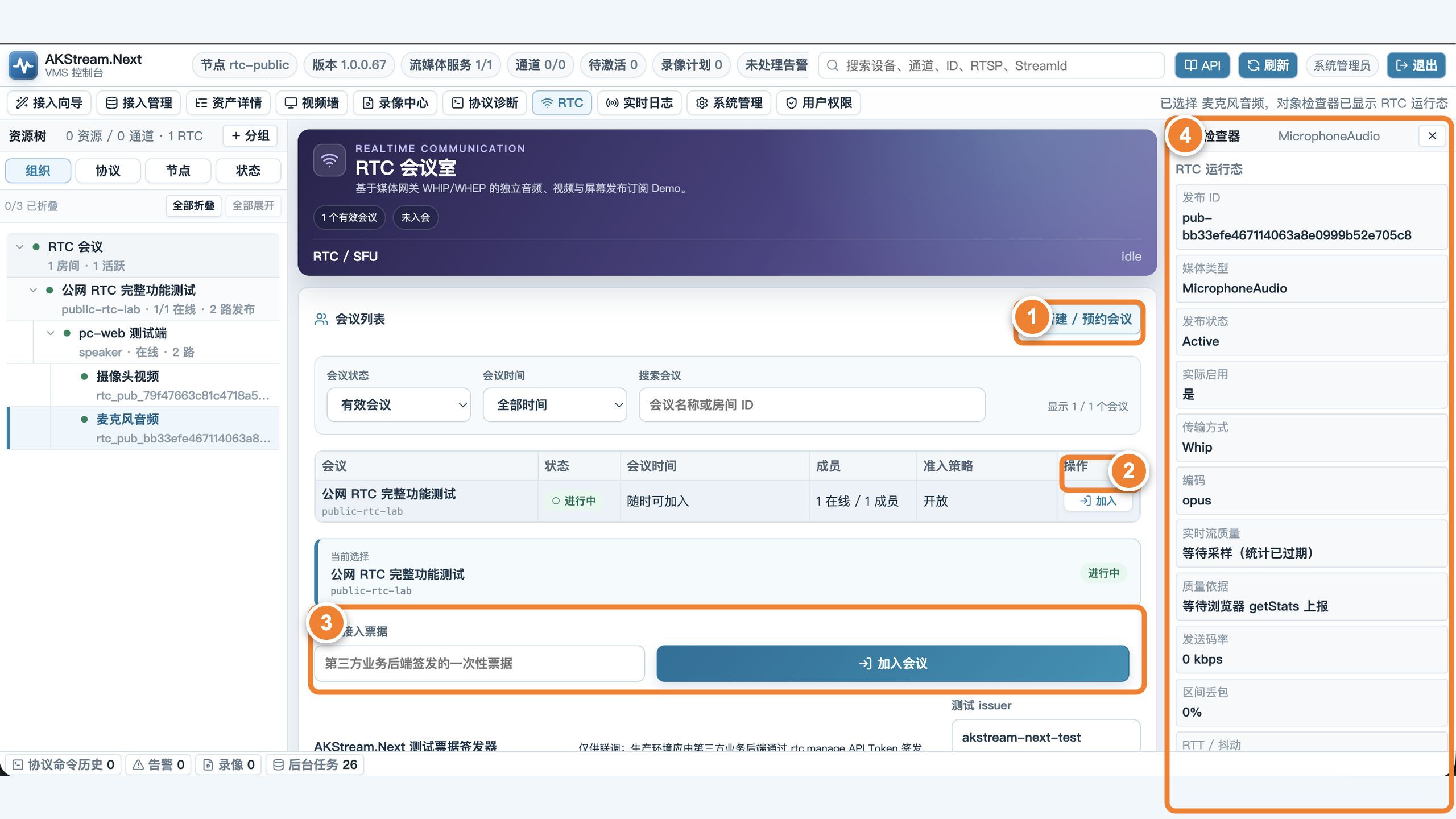
This numbered image comes from an earlier RTC page. In 1.0.0.158 the navigation item is “Video meeting.” Follow the room list, Join action, and object status in your installed version.
Follow the numbers: ① create or schedule a meeting; ② select Join in the meeting list; ③ for an integrated business flow, enter a short-lived join ticket and join; ④ select a participant or medium and verify publication, codec, bitrate, and packet loss in the inspector.
Use only two participants for the first test
- Open the RTC page over HTTPS and create a test meeting.
- Join from the first browser and allow camera and microphone access.
- Join the same meeting from a second browser or another computer.
- Publish audio/video from both sides and subscribe to the other participant.
- Let each side mute, disable video, share the screen, and leave normally.
Success means the member list matches real participants, both sides have audio and video, and participants and media sessions disappear after leaving.
Browser-to-media-node flow
sequenceDiagram
    participant B as Browser
    participant A as AKStream.Next
    participant M as MediaServer SFU
    B->>A: Join room and obtain short-lived ticket
    B->>A: Publish SDP Offer through WHIP
    A->>M: Proxy this publication negotiation
    M-->>A: SDP Answer and session location
    A-->>B: Return authorized negotiation result
    B->>A: Subscribe through WHEP
    A->>M: Proxy this subscription negotiation
    M-->>B: Carry media after ICE connects
WHIP/WHEP bodies are application/sdp, not JSON. Use the matching RTC SDK to manage sessions, token renewal, and release. A direct protocol integration must handle the real session ID, Location, and ETag rather than saving only SDP text. Refresh and reconnect also require old device-session cleanup.
Why HTTPS, STUN, and TURN matter
Mainstream browsers expose camera and microphone only in a secure context. HTTPS secures the page and signaling, but media connectivity still depends on ICE:
| Site network | Usually required |
|---|---|
| Same LAN | Host candidates may be enough |
| Ordinary home or public NAT | STUN discovers the public mapping |
| Symmetric NAT, strict enterprise network, carrier network | TURN relay |
| Network blocks UDP | TURN TCP/TLS path |
TURN credentials must be short-lived, and relay ports and bandwidth need separate capacity planning. A multi-NIC server must not publish unreachable interface addresses to browsers.
Video without audio or only one side can watch
Check in this order:
- Whether the browser address bar denied camera or microphone access.
- Whether the relevant audio/video m-line exists in SDP with the correct direction.
- Whether both sides share a codec and Safari received separate compatibility testing.
- Whether ICE candidates are reachable or remain in checking/failed.
- Whether the enterprise network blocks UDP and TURN TCP/TLS really works.
- Whether an old Participant or MediaSession remains after refresh.
Room events resume by stable sequence or cursor and consumers must process them idempotently. When participant heartbeat expires, the platform should release related publications, subscriptions, and resources.
Acceptance check
- Cover Chrome, Edge, and any Safari version required by the project.
- Cover LAN, public NAT, TURN relay, and UDP-disabled networks.
- Test two-party, multiple members, screen sharing, denied permission, and duplicate join.
- Test refresh, brief outage, sleep/wake, and resource release after a normal leave.
- Room recording reaches publication, file, and index rather than only returning control success.
If it still fails, continue with RTC or browser connection failure.