RTC SDK recording and meeting replay
The current host decides whether to record, and an authorized platform management API can also control it. The room must allow recording first. Allowing recording does not start it. Ordinary members may read the current state but do not gain start/stop rights merely because a button is visible.
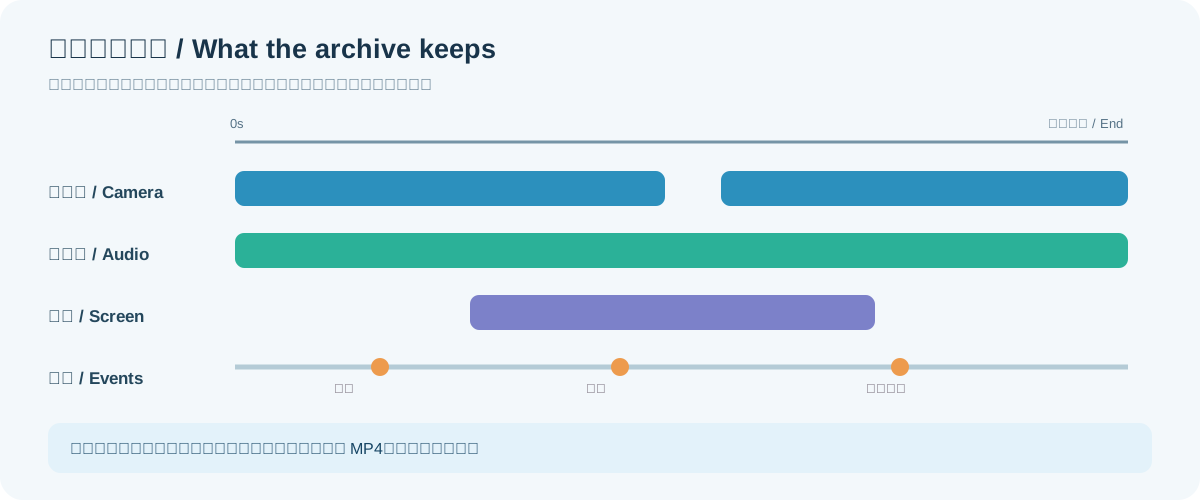
Version boundary: continuous recording, member copies, archive tickets, and interactive replay are included in the the matching version local release. An older 1.0.0.157 app does not gain new controls when only the server changes. Match SDK and installed app builds; UniApp custom-base and the new iPhone host button still need the target-specific acceptance checks.
flowchart LR
    A["Room allows recording"] --> B["Host starts a continuous run"]
    B --> C["Separate member and screen tracks"]
    B --> D["Chat, whiteboard, and host events"]
    C --> E["Post-meeting compatible files and indexes"]
    D --> F["Shared timeline"]
    E --> F
    F --> G["Interactive replay or on-demand export"]
During the meeting
Web/H5, Android, and iOS SDKs expose startContinuousRecording, stopContinuousRecording(recordingId), and getContinuousRecording; UniApp has matching facade methods. The room snapshot includes recordingEnabled and canControlRecording. Web/Android onContinuousRecordingChanged, iOS didChangeContinuousRecording, and UniApp recordingState let the host display status. No active run returns null. A Stopping result means files are still finalizing.
The previous host loses start/stop authority after transfer. Audio and video are captured separately, while compatible member/screen outputs are prepared afterward. Muted or disconnected intervals must not be presented as invented live media. A fixed-layout MP4 and interactive replay serve different needs; the host renders whiteboard and speaking outlines from events on the timeline.
For a host's Web controls, client is the joined AkRtcWebClient. Keep the returned recordingId in this meeting's page state; older per-publication startRecording is not the continuous run:
const started = await client.startContinuousRecording()
const recordingId = started.recordingId
// Show Starting, then Recording after the state callback confirms it.

const current = await client.getContinuousRecording()
if (current?.recordingId === recordingId) {
  await client.stopContinuousRecording(recordingId)
}
// Stopping means files are still finalizing; wait before offering download.
Host transfer, disabled room policy, missing permission, or media-node failure may reject control. Show the error and offer a state refresh; do not retry 403 forever. Ordinary members query and subscribe to state rather than seeing an enabled start/stop control.
After the meeting
An admission ticket is not an archive ticket. Your backend issues a short-lived archive ticket to an authorized user for a room: view covers the catalog and events, play covers media, and download covers files and ZIP. Room scope, user account, and source credential are checked again. The UI uses the headless archive SDK to search by recordingId and load that run's manifest, members, device tracks, and resource URLs. Distinguish two devices of one person with participantId + deviceSessionId.
Chat attachments and whiteboard images can be viewed or downloaded only when referenced by authorized public events in that run. Private chat does not become public to a host. Renew an expired ticket through your backend. Match exact fields to the delivered RTC recording API contract and server OpenAPI. The host owns layout, player, and permission messages.
Get replay material through the headless archive SDK
Your backend calls POST /api/v2/rtc/rooms/{roomId}/recordings/access for this business user and the needed view, play, or download action. The host gives the SDK a ticket provider that returns { token, roomId, actions, expiresAtUtc }. It must be able to request a fresh ticket on the next call rather than permanently caching one that may expire:
import { AkRtcArchiveClient, rtcArchiveSpeakers } from '@akstream/rtc-web-sdk'

const archive = new AkRtcArchiveClient({
  baseUrl: serverOrigin,
  accessProvider: (roomId, action) => businessBackend.getRtcArchiveTicket(roomId, action)
})
const page = await archive.queryRecordings(roomId, { page: 1, pageSize: 20 })
const selected = page.items[0]
if (selected) {
  let cursor = 0
  const events = []
  let manifest
  do {
    manifest = await archive.getManifest(roomId, selected.recordingId, { afterSequence: cursor })
    events.push(...manifest.events)
    cursor = manifest.nextSequence
  } while (manifest.hasMoreEvents)
  const speaking = rtcArchiveSpeakers(events, 20000)
  console.log('Devices speaking at 20 seconds', speaking)
}
serverOrigin is the AKStream.Next HTTPS origin; businessBackend.getRtcArchiveTicket is your application's own authorization function. The SDK does not decide which user may see a room. The recording catalog uses page/pageSize; events within one recording use nextSequence. The example reads that recording's events before calculating who spoke. For large timelines, the UI may render pages as they arrive, but an empty first page does not prove nobody spoke later.
| Task | SDK method | Action |
|---|---|---|
| Find recordings in a room | queryRecordings(roomId, { page, pageSize, search, deviceSessionId }) |
view |
| Replay chat, whiteboard, and speaking at the right time | getManifest(roomId, recordingId, { afterSequence }) |
view |
| Play a media segment | getMediaResource with a fileId from the manifest |
play |
| Download a segment or ZIP | getDownloadResource or getPackageResource |
download |
Resource methods return short-lived URLs for your player or downloader. Do not persist them as permanent business records. Catalog filters narrow the recording search; they do not change the members or timeline within a run.
What interactive replay must restore
| Material | How the host uses it | When absent |
|---|---|---|
| Member camera and microphone | Separate contemporaneous devices by participantId + deviceSessionId on the timeline |
Show no media for that interval instead of freezing a previous frame |
| Screen share | Play as a separate publication alongside members | Keep other member views |
| Chat and whiteboard | Apply events at their recorded time | Do not show the final board at every earlier point |
| Speaking and host changes | Highlight the recorded device and host | Mark unknown when an older archive lacks events |
A full-meeting MP4 is an on-demand post-meeting export, not an extra continuous transcode during the meeting. Preserve real gaps, mute, and camera-off intervals; an interactive host can label them as having no media.
For every archive method's input, result, and error see archive SDK methods. Host action payloads are in room controls, and backend ticket/resource routes are in the RTC archive HTTP API.