Search, play, download, and clip recordings
First identify the source. Platform-local recordings are searched by file index in Recording Center. GB28181 device-side recordings require a device history query followed by device playback. They are not the same list.
Search platform-local recordings
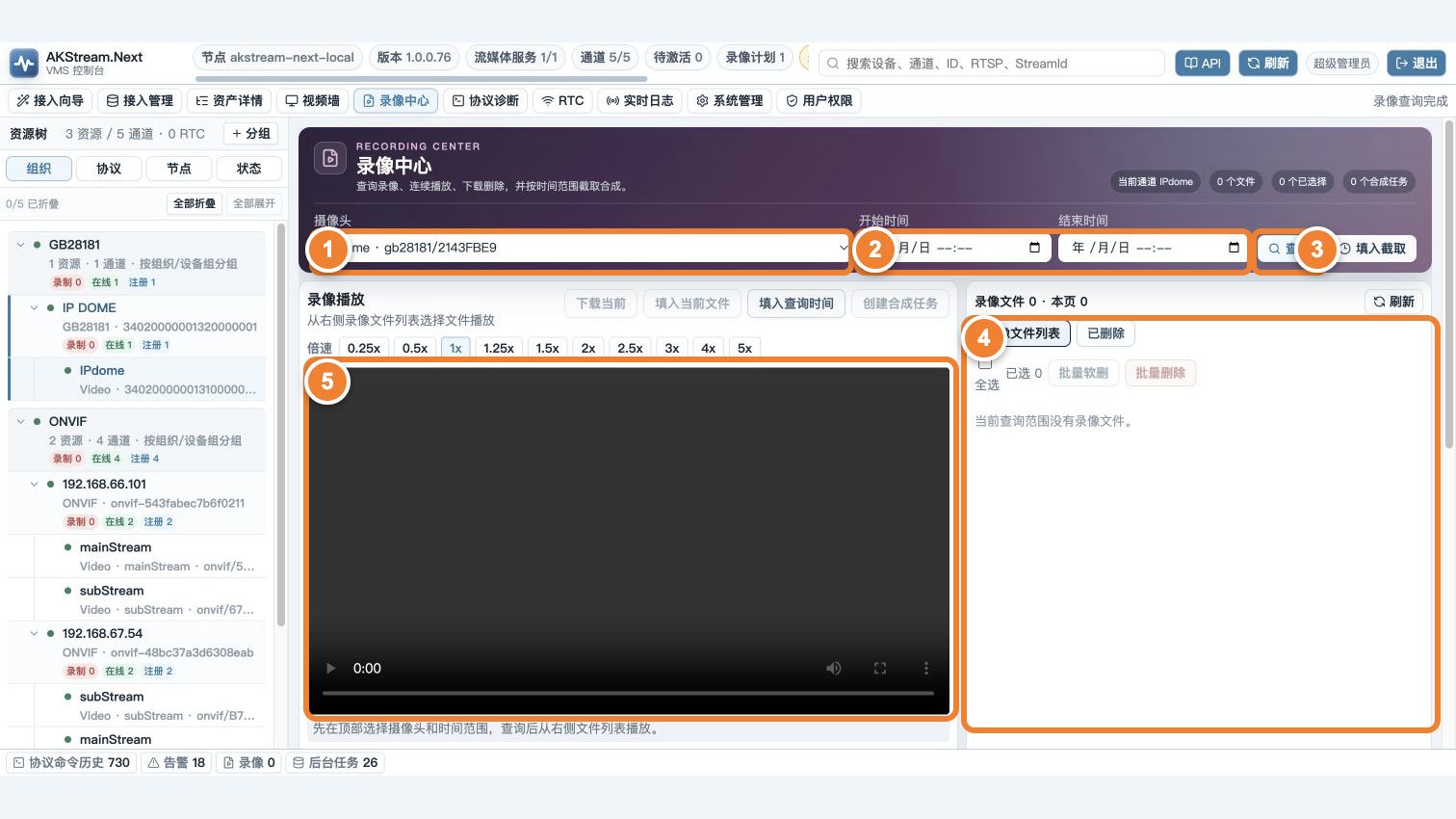
Follow the numbers: ① select channel; ② select time; ③ search; ④ select a file; ⑤ play and verify. When results are empty, check the first three items before concluding that recording is missing.
- Open Recording Center and select a channel first.
- Choose the smallest useful start and end range and confirm the displayed time zone.
- Click Search, then select a result from the file list on the right.
- Click Play and compare video content, file time, and player duration.
- Download only when the original file must be delivered.
If nothing is found, first widen the time range and verify the time zone. A file on disk but no result in the page means the WebHook, scanner, or index backlog needs attention; do not immediately record again.
Why playback or download can fail
flowchart LR
    A[User selects file] --> B{Permission?}
    B -->|No| C[Access denied]
    B -->|Yes| D{Path under allowed root?}
    D -->|No| E[Safety gate rejects]
    D -->|Yes| F[Range playback or download]
The platform checks user permission, owning node, allowed recording root, normalized path, and physical file state. Large-file playback depends on HTTP Range; the reverse proxy must preserve Range and Content-Length and avoid buffering the entire file in proxy memory.
Preserve wall-clock progress after leaving the page
While a recording is playing, the page records the current file position, leave time, and playback rate. On return it advances by real elapsed time: it seeks within the current MP4 when possible, selects the correct file after crossing a segment boundary, skips to the next segment when the target falls in a recording gap, and lands at the last segment end after the query range. Browser background suspension therefore does not resume several minutes behind.
A recording paused manually before leaving remains paused and is not advanced. This rule applies to platform-local files; GB28181 device-side playback still depends on the device implementation of pause, speed, and seek commands.
Delete and restore
| Action | What happens | When to use |
|---|---|---|
| Soft delete | Hidden from the normal list while the file remains | Routine cleanup and mistake protection |
| Restore | Visible again if the file exists and the path is valid | Undo an accidental deletion |
| Physical delete | File is removed irreversibly | Only after scope and retention are confirmed |
Before bulk physical deletion, export the target list and check channel, time, node, and total size. Never permanently delete with an ambiguous filter.
Clip or merge a recording segment
- Select source files on the same timeline and the target start/end time.
- Create a clip/merge job and retain its job ID.
- Wait for a final success or failure state in background jobs.
- Play the output and check duration, picture, and A/V synchronization.
- Download the result or clean it according to retention policy.
A missing source, incompatible codec, low disk space, unavailable FFmpeg, or queue backlog can fail the job. Read the job error first; do not retry the same invalid job indefinitely.
GB28181 device-side recordings
Query the device for historical recordings first. After the device returns time ranges, start a playback INVITE and RTP media. Speed, seek, and time format depend on protocol version and vendor implementation and must be accepted on the target model.
Acceptance check
- An ordinary user can find a requested channel and time range within one minute.
- Browser playback and file download both complete on the real network.
- Accounts with different permissions cannot read each other's unauthorized recordings.
- Soft delete is recoverable and physical delete affects only explicit targets.
- A clip job has a final result and its output is traceable to source files.